What is NAT Gateway in AWS? How It Works, Use Cases & Best Practices
Learn what NAT Gateway is in AWS, how it works, why it's used in VPC architecture, and how to design secure private subnets with real-world examples.

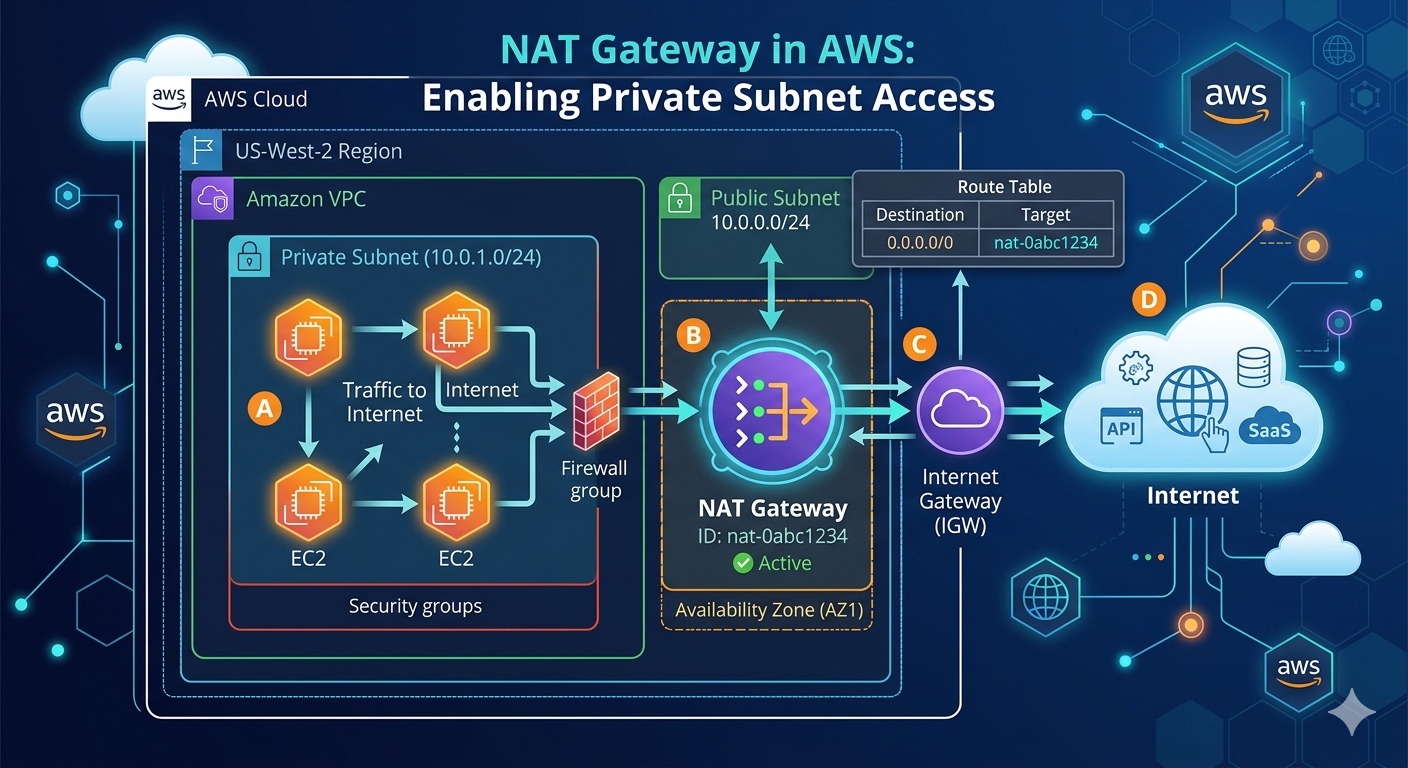
When designing a secure AWS architecture, a common question arises:
How can private servers access the internet without being exposed to it?
This is where the NAT Gateway becomes essential.
Why This Matters
Without NAT Gateway:
- Private instances cannot access internet ❌
- Cannot install updates or packages ❌
- Cannot call external APIs ❌
With NAT Gateway:
- Secure outbound internet access ✅
- No inbound exposure ✅
- Better security architecture ✅
What is a NAT Gateway?
A NAT Gateway (Network Address Translation Gateway) is a service that allows instances in a private subnet to connect to the internet without allowing inbound connections from the internet.
👉 In simple terms:
Private resources can go out to the internet, but the internet cannot directly access them.
How NAT Gateway Works
        Internet
            |
   [Internet Gateway]
            |
     [Public Subnet]
            |
     [NAT Gateway]
            |
     [Private Subnet]
            |
     [Backend Server]
🔍 Flow Explanation
- Private server sends request (e.g., API call)
- Request goes to NAT Gateway
- NAT Gateway forwards it to the internet
- Response returns to NAT Gateway
- NAT Gateway sends it back to the private server
👉 External systems never directly communicate with private resources
💡 Real-World Example
Let’s say you have:
- Frontend → Public subnet
- Backend → Private subnet
- Database → Private subnet
Backend needs to:
- Call third-party APIs
- Install dependencies
- Fetch external data
👉 NAT Gateway enables all of this securely
⚔️ NAT Gateway vs Internet Gateway
| Feature | NAT Gateway | Internet Gateway |
|---|---|---|
| Used for | Private subnet | Public subnet |
| Inbound traffic | ❌ Not allowed | ✅ Allowed |
| Outbound | ✅ Allowed | ✅ Allowed |
| Security | High | Medium |
🔧 Required Configuration
To use NAT Gateway properly:
- Place NAT Gateway in public subnet
- Attach an Elastic IP
- Update private subnet route table:
0.0.0.0/0 → NAT Gateway
❌ Common Mistakes
- Placing NAT Gateway in private subnet ❌
- Forgetting route table configuration ❌
- Not attaching Internet Gateway ❌
- Expecting inbound traffic via NAT ❌
⚡ When to Use NAT Gateway?
Use NAT Gateway when:
- You want private resources to access the internet
- You need secure backend communication
- You are building production-ready architectures
Interview Questions
- What is NAT Gateway?
- Why is it used in VPC?
- Difference between NAT Gateway and Internet Gateway?
- Can NAT Gateway accept inbound traffic?
- Where should NAT Gateway be placed?
Best Practices
- Use NAT Gateway for private subnet internet access
- Place it in public subnet
- Use multiple NAT Gateways for high availability
- Monitor costs (NAT Gateway is paid)
Key Takeaway
- NAT Gateway = Secure outbound internet for private resources
- Keeps backend systems hidden from public internet
- Essential for production-grade architecture
Conclusion
NAT Gateway is a critical component in AWS networking.
It allows:
- Private instances to stay secure 🔒
- While still accessing the internet 🌐
Understanding NAT Gateway helps you:
- Design secure systems
- Build scalable architectures
- Crack AWS interviews